

Traditionally, NAV Tech Days became one of the greatest technical conferences in the NAV/BC world this year. As usual, this conference was a great opportunity to see where the product is heading, and how Business Central (BC) is becoming an integrated part of the Microsoft ecosystem. Some of the new changes that were released with Microsoft Dynamics Business Central wave 2 were already described in one of our previous blogs. Nevertheless, in this article, we would like to share with you the most valuable features that were announced by the Microsoft team during the NAV Tech Days 2019.
Modern Client
-
Present to the users the whole content of the navigation bar of the current role, structured as a tree view
-
Access a second overview showing the business features of all roles in the product
-
Explore features that are not normally assigned to the user’s role
- Create a new profile to represent any user role in the organization
- Copy an existing profile
- Edit the basic fields of a new/copied profile
- Delete a new profile
- Create URLs to any profile (e.g. https://businesscentral.dynamics.com/?profile=ACCO...)
- Customize and role-tailor Business Central without writing code
- Do lightweight UI customization for a role using the rich capabilities of the in-client designer
- Download a copy of all profile customizations in AL format
- Clear customization per page
- Open several browser tabs or windows while working in the same company
- Pop out a card or document into a smaller, connected window
- A new multi-selection control in filters for fields of type Option so that users can filter on these by multiple values
-
Save a new list view with custom filters on specific fields, on totals, and other calculated fields
-
Fine-tune and perfect your views over time by saving changes to them
-
Clone any system view by saving a personal copy that you can modify
-
Easily rename and remove personal views
-
Quickly switch between different views of a list in the filter pane or from the command menu, no matter how you accessed that page
Сучасний клієнт
-
Представити користувачам весь вміст панелі навігації поточної ролі, структурований у вигляді дерева
-
Отримайте доступ до другого огляду, що показує бізнес-особливості всіх ролей у продукті
-
Дослідіть функції, які зазвичай не призначені для ролі користувача
- Створіть новий профіль, який представлятиме будь-яку роль користувача в організації
- Копіювати існуючий профіль
- Редагувати основні поля нового/скопійованого профілю
- Видалити новий профіль
- Створіть URL-адреси для будь-якого профілю (наприклад, https://businesscentral.dynamics.com/?profile=ACCO... )
- Налаштовуйте та адаптуйте Business Central до ролей без написання коду
- Виконайте легке налаштування інтерфейсу користувача для ролі, використовуючи багаті можливості дизайнера клієнта
- Завантажте копію всіх налаштувань профілю у форматі AL
- Очищення налаштувань для кожної сторінки
- Відкривати кілька вкладок або вікон браузера під час роботи в одній компанії
- Розгорніть картку або документ у меншому, підключеному вікні
- Новий елемент керування множинним вибором у фільтрах для полів типу Option, щоб користувачі могли фільтрувати їх за кількома значеннями.
-
Збереження нового подання списку з налаштовуваними фільтрами для певних полів, підсумків та інших обчислюваних полів
-
З часом налаштовуйте та вдосконалюйте свої перегляди, зберігаючи в них зміни
-
Клонуйте будь-яке системне представлення, зберігаючи особисту копію, яку можна змінювати
-
Легко перейменовуйте та видаляйте особисті перегляди
-
Швидко перемикайтеся між різними поданнями списку в області фільтрів або з меню команд, незалежно від того, як ви отримали доступ до цієї сторінки
Modern Application Platform
-
Current Status:
-
Future Planes:
- Continue to componentize Base Application
-
Move local functionalities to separate extensions
-
Consolidate common functionality into W1 extensions
-
Add new modules to system applications
Сучасна платформа додатків
-
Поточний стан:
-
Майбутні літаки:
- Продовжити компонентизацію базової програми
-
Перенесіть локальні функції до окремих розширень
-
Об'єднати спільний функціонал у розширення W1
-
Додавання нових модулів до системних програм
Modern Development
-
Access Modifiers
-
Rapid Application Development
-
Debug Without Publishing (Ctrl+Shift+F5)
-
Attach and Debug Next
Сучасний розвиток
-
Модифікатори доступу
-
Швидка розробка застосунків
-
Налагодження без публікації (Ctrl+Shift+F5)
-
Підключення та налагодження Далі
Modern Platform
-
Non-blocking number sequence
- New object Type in AL: NumberSequence
-
Generate fast, non-blocking number series
-
Might be non-consecutive
- All records now have a unique immutable key (SystemId)
- The SystemId field is a GUID data type field that specifies a unique, immutable (read-only) identifier for records in the table
- Immutable Key = Surrogate Key
- Fully managed intelligent performance service
- Continuously monitor database queries
- Use built-in intelligence
- Automatically improves performance
-
Do long-running operations in the background
-
Page remains responsive while the task runs in the background
Сучасна платформа
-
Неблокуюча числова послідовність
- Новий об'єкт Введіть в AL: NumberSequence
-
Генеруйте швидкі, неблокуючі числові ряди
-
Можливо, не послідовно
- Усі записи тепер мають унікальний незмінний ключ (SystemId)
- Поле SystemId – це поле типу даних GUID, яке визначає унікальний, незмінний (лише для читання) ідентифікатор для записів у таблиці.
- Незмінний ключ = Сурогатний ключ
- Повністю керований інтелектуальний сервіс продуктивності
- Постійно відстежувати запити до бази даних
- Використовуйте вбудований інтелект
- Автоматично покращує продуктивність
-
Виконуйте тривалі операції у фоновому режимі
-
Сторінка залишається адаптивною, поки завдання виконується у фоновому режимі
From the Lab
This section includes features which are currently under development by the Microsoft team and, hopefully, will be released in the near future.
Automatic creation of 2 databases (in the background) during the creation of SQL Azure Instance in the cloud:
- Primary Replica (Read\Write)
- Secondary Replica (Read-Only)
- Add a new ReadOnly property (on page, query, etc.) to provide a possibility to read data from the read-only replica on the SQL Azure instance
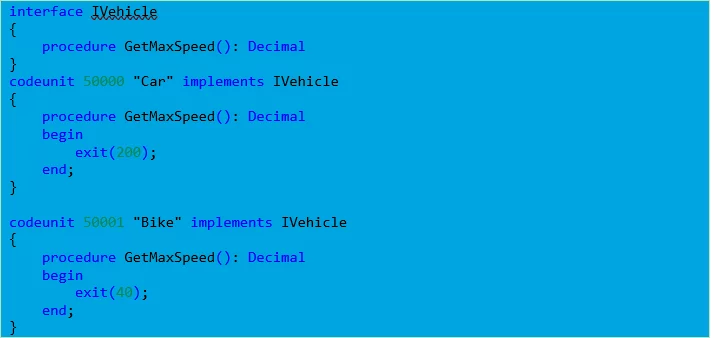
- New object Type in AL: Interface
- Allows creating code that specifies which functions a codeunit must implement, without having to define how these functions are implemented
Example of Implementation:

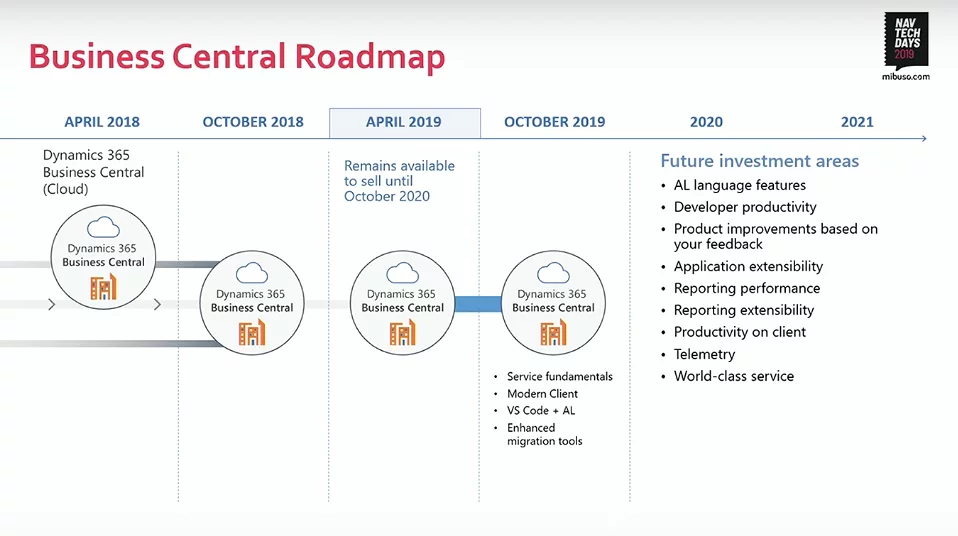
Also, a new road map for Dynamics 365 Business Central was announced by Microsoft. As usual, this road map includes key investment areas for the nearest future:

Additionally, great news for those who unfortunately were not able to visit the NavTechDays conference this year:
-
all sessions have been recorded and are available on YouTube: https://www.youtube.com/mibusocom
-
all presentations can be download from mibuso.com: https://mibu.so/o0wrj
З лабораторії
Цей розділ містить функції, які зараз розробляються командою Microsoft і, сподіваємося, будуть випущені найближчим часом.
Автоматичне створення 2 баз даних (у фоновому режимі) під час створення екземпляра SQL Azure у хмарі:
- Первинна репліка (читання/запис)
- Вторинна репліка (лише для читання)
- Додайте нову властивість ReadOnly (на сторінці, у запиті тощо), щоб надати можливість читати дані з репліки лише для читання в екземплярі SQL Azure.
- Новий тип об'єкта в AL: Інтерфейс
- Дозволяє створювати код, який визначає, які функції має реалізовувати кодовий модуль, без необхідності визначати, як ці функції реалізуються.
Приклад реалізації:

Також Microsoft оголосила про нову дорожню карту для Dynamics 365 Business Central. Як завжди, ця дорожня карта включає ключові напрямки інвестицій на найближче майбутнє:

Крім того, чудові новини для тих, хто, на жаль, не зміг відвідати конференцію NavTechDays цього року:
-
Усі сесії записані та доступні на YouTube: https://www.youtube.com/mibusocom
-
Усі презентації можна завантажити з mibuso.com: https://mibu.so/o0wrj